
Search Console clarity, wherever the work happens.
A calm, private way to understand what changed and find opportunities worth acting on.
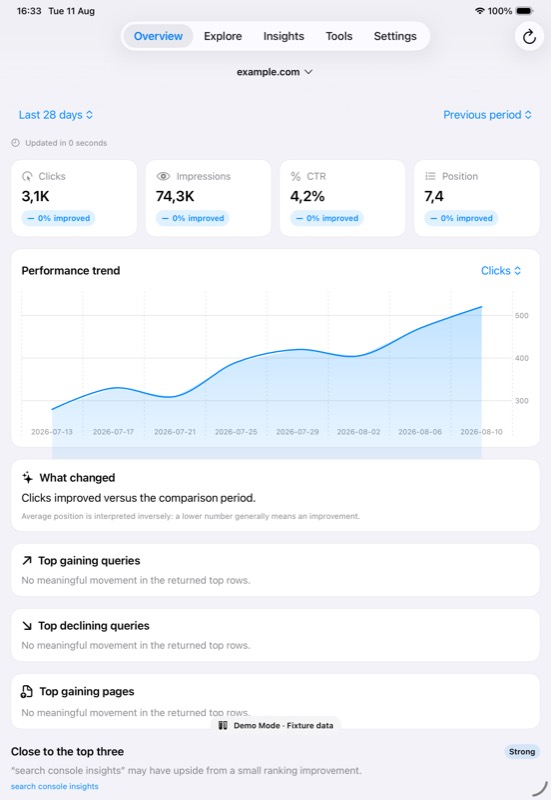
See what changed.
Find what matters.
SearchPulse turns available Search Console data into a focused mobile workspace for comparisons, exploration and evidence-backed opportunities.
-
1
Compare performance
Review clicks, impressions, CTR and position alongside a previous period.
-
2
Explore every angle
Move through queries, pages, countries, devices and search appearances.
-
3
Inspect with context
Read URL Inspection and sitemap results without write actions or indexing requests.
-
4
Explain on-device
On supported devices, Pro can turn verified metrics into a private Apple Intelligence explanation without sending identifiers to a server model.
Insights identify patterns, not causes.
Read-only by design.
SearchPulse connects directly to Google. Cached data, watchlists and settings stay on your device.
No SearchPulse server in version one
No advertising or user tracking
Clear controls to disconnect and delete local data
Frequently asked questions
Does SearchPulse change my Search Console data?
No. SearchPulse cannot modify properties, submit indexing requests or change sitemaps.
Where is my data stored?
Cached Search Console records, property choices, watchlists, recent inspections and settings stay in the app’s local container on your device. A compact snapshot may be shared only with the SearchPulse widget.
Is SearchPulse affiliated with Google?
No. SearchPulse is an independent application by Priority Bit and is not affiliated with or endorsed by Google.
How do I get support?
Visit the support page for setup help, troubleshooting, purchase guidance and contact details.